
The backup function enables you to automatically create chronological backups of specific projects. These projects are stored locally as .join files at a location of your choice.
This is convenient if you want to back up mobile server setups without a connection to a cloud server.
The backup function always saves all existing projects of the logged-in user.
Typically you would use a dedicated PC as a backup device, log in with a specific “Backup” user and start the backup function by pressing Ctrl+B on the DEON start screen.
All projects that you share with this user will then be continuously backed up.
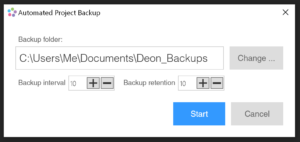
You can adjust the backup interval in minutes.
The backup retention defines how many backup generations are retained until the oldest backup is automatically deleted to save storage space.
For each existing project of the user a new folder is created. The folder is named after the project ID, because the name of the project itself could change over time.
In each folder you will find the saved stages of this project, which end with their revision number. The revision number indicates the number of changes a project has undergone since its creation. The latest version of a project has the highest revision number.
NOTE: A backup is only created if a project has changed.
To stop the backup process, log out of DEON or right-click on the DEON tray icon and select 'Exit'.